CUSTOM POLICIES
Policy as code for consistent automation governance
Custom Policies in Spotter let you define, enforce, and scale your own security, compliance, and quality standards across Ansible playbooks.
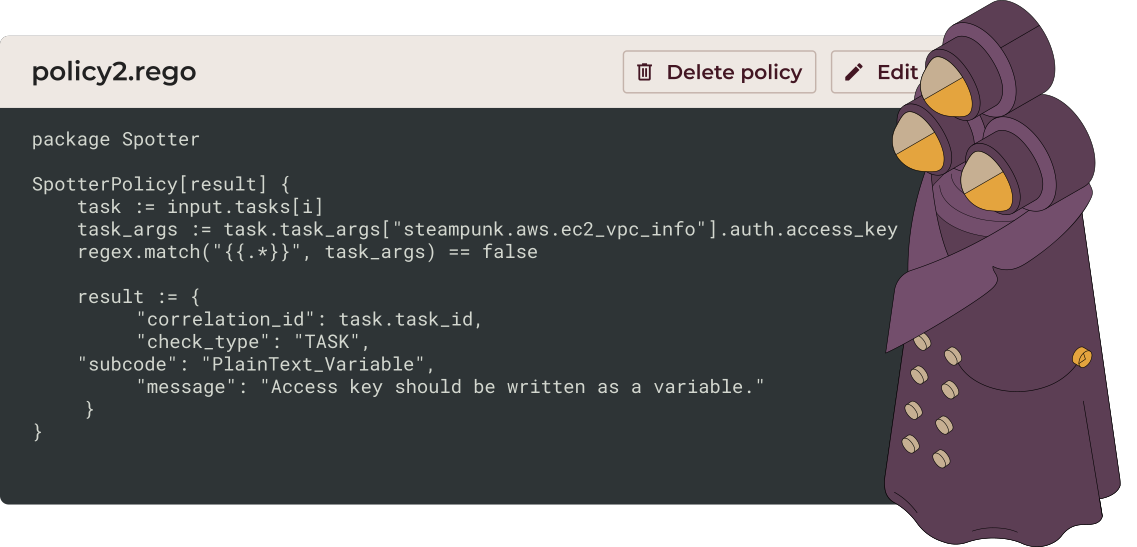
- Define policies that match your standardsCreate custom security, compliance, and quality rules tailored to your organization’s requirements.
- Simplify policy managementTurn policies into checks that run on every playbook scan, reducing review time and rework.
- Ready-to-use CIS benchmark policiesUse AI-generated policies aligned with CIS Benchmarks to quickly check your playbooks against recognized security standards.
- AI-assisted policy creationGenerate REGO policies from plain-language security requirements and turn them into checks in seconds.
TRUSTED BY






KEY BENEFITS
Built to enforce security, compliance, and consistency across your automation

Enforce your standards automatically
Turn internal rules, security requirements, and compliance policies into enforceable checks that run on every playbook scan.

Prevent risks before production
Catch security misconfigurations and sensitive data exposure early, reducing rework, incidents, and manual reviews.

Standardize Ansible automation
Apply the same standards and governance everywhere, so playbooks are reliable, compliant, and easy to maintain at scale.
Go beyond built-in checks
Built-in checks are a great baseline. But real automation environments are often more complex. Different teams, industries, and clients all operate under different rules.
Custom Policies allow you to:
- Codify internal standards and best practices
- Enforce security and compliance requirements automatically
- Prevent risky patterns before deployment


Define rules that match your standards
With Custom Policies, you can create rules tailored to your environment, such as:
- Modules & naming: Control allowed modules and standardize play, task, and variable names.
- Parameters & security: Enforce required values, ports, VM sizes, and regions.
- Sensitive data: Protect secrets and personal information automatically.
This lets you enforce standards aligned with CIS, HIPAA, GDPR, or your internal policies.
Policy as code for scalable governance
With Spotter, security rules, standards, and conventions are enforced automatically, ensuring consistent, compliant automation without manual reviews. Governance stays repeatable, auditable, and scalable as automation grows.
- Shared, enforceable definition of secure automation.
- Consistent structure, naming, and behavior across playbooks
- Automated enforcement that keeps development fast

Create custom rules to boost security, ensure compliance and tailor your automation to fit your exact needs
Built for automation teams

Security & Compliance Teams
Protect sensitive data and enforce regulatory and internal policies automatically.

DevOps & Platform Teams
Standardize playbooks and reduce manual reviews for consistent, reliable automation.

DevSecOps & CI/CD Teams
Validate every playbook change in pipelines before deployment to catch issues early.

“Spotter’s Custom Policies allowed us to align our automation with the bank’s specific requirements. We created a ‘white book’ of rules that ensured tagging, naming, error handling, and looping standards were consistently enforced.”
DevOps Team,
Computer Space
Computer Space

Related resources

Custom Policies: Achieve secure and compliant automation
An introduction to Custom Policies, OPA support, and how to define organization-specific rules for Ansible playbooks.

Spotter Custom Policies 101: Preventing Sensitive Information Leakage in Your Playbooks
Learn the basics of creating and importing custom policies to detect sensitive data early.

Spotter Custom Policies 102: Detecting Sensitive Data in Variables and Beyond
Go deeper into identifying sensitive values across tasks, variables, and playbooks.

Spotter Custom Policies 103: Preventing PII Leaks in Ansible Playbooks
A real-world security scenario showing how Custom Policies enforce no_log usage to prevent exposure of personal data and credentials.
Contact our team
Get all questions answered and learn about Steampunk Spotter for enterprises.
- Schedule a demo
- Get pricing information
- Explore use cases for your team


Processing, please wait...
Thank you for reaching out to us
We will get back to you shortly.
FAQ
What are Custom Policies in Spotter?

Custom Policies allow you to define your own security, compliance, and quality rules for Ansible playbooks. They extend Spotter’s native checks by enforcing organization-specific standards, client requirements, and regulatory policies directly during playbook scans.
What problems do Custom Policies solve?
Custom Policies help prevent security misconfigurations, sensitive data exposure, and inconsistent automation practices. They replace manual reviews and unenforceable guidelines with automated checks that run every time a playbook is scanned.
How are Custom Policies written and evaluated?
Custom Policies are written in Rego and evaluated using the Open Policy Agent (OPA) engine. Policies analyze data extracted from Ansible tasks and playbooks and return clear results when defined conditions are not met.
Can Custom Policies help prevent sensitive data and PII leaks?
Yes. Custom Policies can detect sensitive parameters such as full names, passwords, API keys, and access tokens. For example, you can enforce that tasks handling sensitive data must use no_log: true, preventing accidental exposure in logs and supporting compliance with regulations like GDPR.
Can I apply Custom Policies only to specific projects or teams?
Yes. Custom Policies can be scoped to an entire organization or limited to a single project. This allows you to enforce strict rules where required without impacting other teams or workflows.
Do Custom Policies integrate with CI/CD pipelines?
Yes. Custom Policies run as part of Spotter scans and can be integrated into CI/CD pipelines such as GitHub Actions and GitLab CI/CD. This ensures every playbook change is validated automatically before deployment.