Is Ansible Lint enough? How to build on it for production-ready playbooks
January 24, 2023 - Updated: October 30, 2026 - Words by The Spotter team - 6 min read

Ansible Lint is a tool that checks your Ansible Playbooks for errors and suggests improvements. Steampunk Spotter checks them too, and then goes further: it enforces your organization’s policy on every change before it reaches production. So, is Ansible Lint enough? Is Spotter just a fancy linter? What does Spotter have that Ansible Lint doesn’t already?
We hear these questions a lot, and we understand them. At first glance, the two tools look similar. The real answer is that they complement each other. Ansible Lint keeps your code clean and consistent, and it’s always the right place to start. Spotter picks up where Ansible Lint leaves off. It’s a governance layer for your automation code that checks every change against your policy, including AI-generated code.
Used together, they take you from clean code to code that’s approved to run.
Why Ansible Lint is the right place to start
Ansible Lint is an essential tool for anyone who writes Ansible content. It’s a command-line tool, maintained by the Ansible community, that checks playbooks, roles and collections against a set of proven rules. It also integrates with VS Code, so you get feedback while you write.
Use Ansible Lint to:
- catch syntax errors, bugs and suspicious constructs,
- validate Ansible syntax to catch misconfigurations,
- enforce community best practices and a consistent style,
- write playbooks, roles and task files that are easy to read and produce consistent results.
Linting saves hours of debugging because it catches the obvious problems before you even run the playbook. That’s why we always recommend running Ansible Lint first.
What to add on top of Ansible Lint for production
Production playbooks raise questions that go beyond style and syntax. Is this collection approved by our security team? Will this playbook still run after our next Ansible upgrade? Who checked this change before it ran, and can we prove it?
A linter can’t answer those questions on its own, because they depend on your environment and your rules. That’s the job of a governance layer. Steampunk Spotter sits between your code and execution and enforces your policy on every change. It doesn’t repeat Ansible Lint’s style checks.
- Policy: define your own rules with policy-as-code, allow only certified and approved collections, and enforce the same rules across the whole organization.
- Coverage: 200+ built-in checks for module parameters, deprecated modules, redirects, missing requirements, security issues and compatibility with a target Ansible version.
- Enforcement points: run the same checks in the IDE, in CI/CD and before execution in Red Hat Ansible Automation Platform (AAP), so nothing skips the gate.
- Evidence: keep a scan history for every change, see the most common issues across teams and show auditors what was checked.
Your code doesn’t only come from engineers anymore. AI assistants, agent pipelines and third-party collections all write Ansible content, and Spotter checks it all against the same policy. The same gate also covers Terraform code, so one set of rules governs your Infrastructure as Code (IaC) across both stacks.
One playbook, checked with both tools
Let’s look at how the two tools work together on a real example. Here’s a short playbook with a few hidden problems:
---
- name: Example playbook
  hosts: localhost

  collections:
    - ansible.builtin

  tasks:
    - name: Create a new user
      user:
        username: joe
        password: "{{ lookup('env', 'SENSU_USER_PASSWORD') }}"

    - name: Run command
      shell: touch /tmp/lock

    - name: Read-only command
      command: ls /tmp
      changed_when: false

    - name: Print a message
      debug:
        msg: Hello from Ansible
      check_mode: true
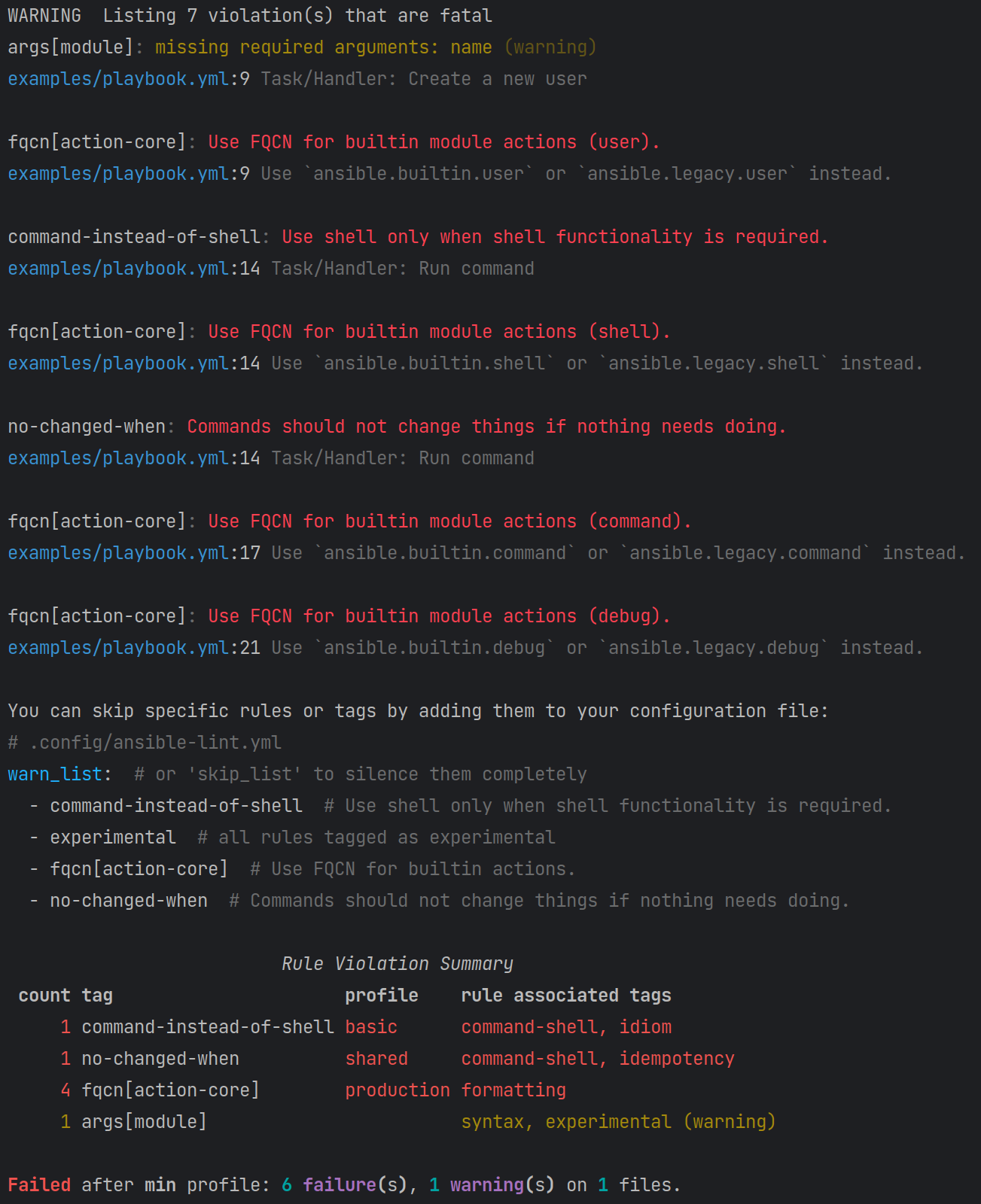
Step 1: Run ansible-lint. It reports these issues:

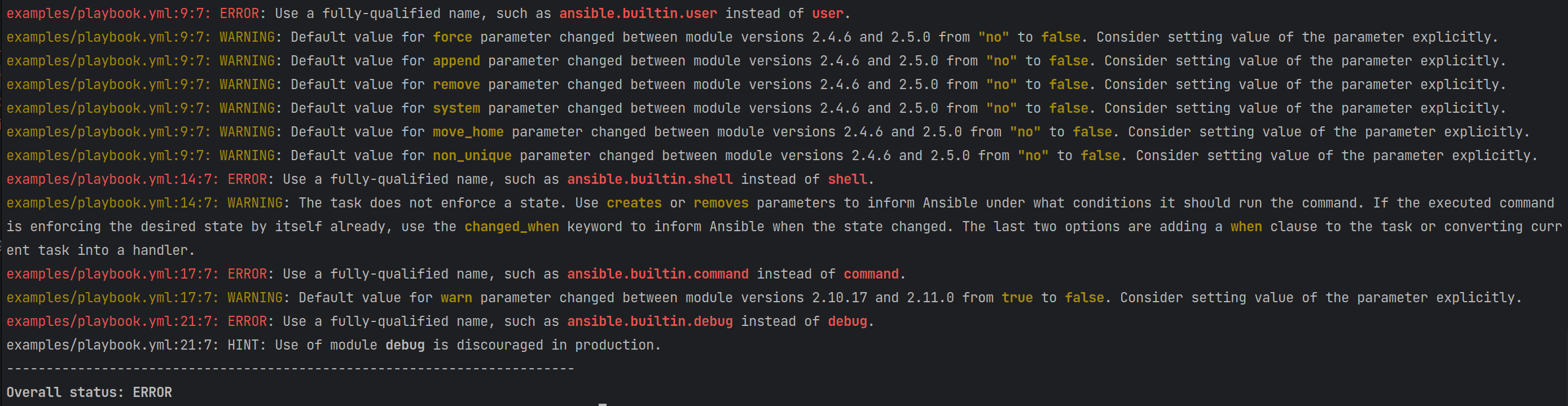
Step 2: Run Spotter after you fix the linter issues. Spotter finds these additional issues:
Some issues show up in both tools, but each tool handles them differently. For example, both report that the playbook should use fully qualified collection names, and both can fix that for you. Spotter goes a step further and also catches module redirects and renamed modules, which depend on the collection versions you use.
Power of unity: using Ansible Lint and Steampunk Spotter together
The workflow is simple. Run Ansible Lint first and fix what it finds. Then run Spotter for the deeper checks. Spotter doesn’t repeat what Ansible Lint already covers, so linting stays a must.
The easiest way to make this a habit is to run both in your CI/CD pipeline, so every change gets checked before it’s merged. Here’s a minimal example for GitHub Actions:
name: Ansible quality checks
on: [pull_request]

jobs:
  check:
    runs-on: ubuntu-latest
    steps:
      - uses: actions/checkout@v4
      - uses: actions/setup-python@v5
        with:
          python-version: "3.12"
      - name: Install tools
        run: pip install ansible-lint steampunk-spotter
      - name: Run ansible-lint
        run: ansible-lint
      - name: Run Steampunk Spotter
        run: spotter scan .
        env:
          SPOTTER_TOKEN: ${{ secrets.SPOTTER_TOKEN }}
Spotter also works with GitLab CI, Jenkins and Azure DevOps. For more pipeline examples, see our CI/CD guide.
Using both for Ansible upgrades
Ansible upgrades are where Spotter adds the most value. Ansible Lint can warn you that something will break in a newer Ansible version. Spotter lets you choose the target version, reads the version you run today, and lists everything you need to change to get from one to the other. Where it can, it rewrites the code for you.
With Ansible Lint and Spotter together, an upgrade can take minutes instead of hours. See the step-by-step process in our Ansible upgrade guide , or watch the full walkthrough in our free webinar.
Start with Ansible Lint, then build on it
Ansible Lint is the right foundation for Ansible quality, and it should stay in every workflow. For production playbooks, add a second layer that checks your content against your environment, your Ansible version and your policies. Running both tools together gives you clean code that’s also safe to run. Ansible Lint takes care of quality, and Spotter makes sure only code that meets your policy reaches production, including AI-generated code.
Want to see how Spotter fits next to Ansible Lint in your workflow? Book a demo.
Frequently Asked Questions
Is Ansible Lint enough for production playbooks?
Ansible Lint is enough to keep your code clean, consistent and free of common mistakes, and every team should use it. For production, most teams also need checks that depend on their environment, such as module parameters for specific collection versions, upgrade compatibility and approved collections. Steampunk Spotter adds those checks on top of Ansible Lint.
Does Steampunk Spotter replace Ansible Lint?
No. Spotter is designed to run after Ansible Lint and doesn’t repeat its style and syntax checks. We recommend using both: Ansible Lint first, then Spotter.
What’s the difference between Ansible Lint and Steampunk Spotter?
Ansible Lint is a linter: it checks your code against community best practices for syntax and style. Spotter is a governance layer: it enforces your organization’s policy on every change before it runs, with checks for modules, parameters, collections, security and Ansible versions. Red Hat AAP governs how automation runs, and Spotter governs what runs. For a full feature-by-feature view, see our Spotter and Ansible Lint comparison.
Can I run Ansible Lint and Spotter in the same CI/CD pipeline?
Yes. Run ansible-lint as the first step and Spotter as the second. Both work with GitHub Actions, GitLab CI and Jenkins, and Spotter also supports Azure DevOps.
Can Spotter fix issues automatically?
Yes, for some issues. Spotter can rewrite missing fully qualified collection names, update renamed or redirected modules and generate a missing requirements.yml file.