Spotter MCP: Spotter now runs inside your AI coding agent
November 26, 2026 - Words by Luka Boljević - 4 min read

AI coding agents write Ansible Playbooks and Terraform configurations in minutes, but they don’t verify that code against your target Ansible version, provider definitions or company policy. Steampunk Spotter now runs inside Claude Code, GitHub Copilot and other AI agents, so the agent checks and fixes its own work before handing it back.
Why AI-written IaC code needs a gate
Agents are good at structure. Ask for a Playbook that deploys a web server, and you’ll get tasks, handlers and variables in the right places almost immediately. What the agent doesn’t have is your context. It doesn’t know which Ansible Core version runs in production, which Terraform provider versions you target, or what your internal rules say about secrets and privilege escalation.
The common workaround is to ask the agent to “follow best practices” or to double-check its work. The agent will say it did. But a model reviewing its own output uses the same knowledge that produced it, so the gaps it couldn’t see while writing are the gaps it can’t see while reviewing.
Generic linters help with style. They don’t know your organization’s policy, and the agent decides on its own whether to run them at all.
A generator can’t be its own auditor. What closes the gap is a deterministic check the agent doesn’t control: one that knows the target version, the provider definitions and the policy, and that the agent must pass before it reports the work as done.
What shipped
1. The Spotter MCP server
A Python package that gives any MCP-compatible agent one tool, spotter_scan. With it, the agent can:
- check files on disk, or content it hasn’t saved yet
- apply Spotter’s automatic fixes
- target a specific Ansible Core version, from 2.0 to 2.20
- apply your organization’s profiles, enforced or skipped checks, and excluded paths
- filter results by severity
These are the same profiles and policies your team already uses in the CLI and CI/CD, so there’s one standard for every author, whether a person or an agent wrote the code.
The output is built for agents: grouped by check, ordered by severity and capped at 40 lines by default, with fixable checks marked. That keeps every run fast and light on tokens.
2. The Spotter agent plugin
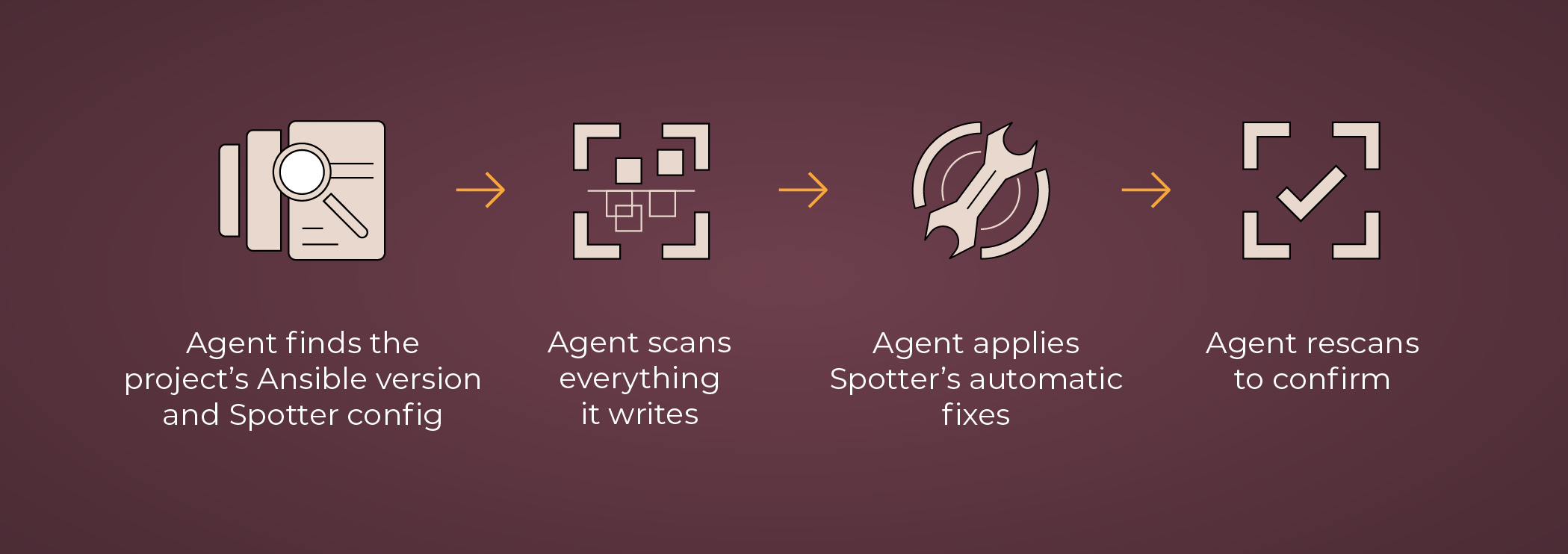
It’s the recommended way to start: one install puts the MCP server and the spotter-scan skill into Claude Code or GitHub Copilot. The skill tells the agent when and how to use Spotter, so it doesn’t depend on the agent deciding to check:
- It prepares before writing, finding the project’s target Ansible version and Spotter config (.spotter.yml).
- It checks everything it writes or changes before calling the work done.
- It works through the findings by task type. For upgrades and fixes, Spotter’s automatic fixes come first, then minimal changes for the rest. For new content, it fixes all findings. For reviews, it reports them and offers to apply fixes.
- It checks again to confirm.
The skill also comes with built-in guardrails. The agent never skips a check to get a pass unless you or your project config ask for it, it only changes content that’s part of the task, and it tells you if Spotter is unavailable instead of switching to another tool.
How to get started
For now, Spotter MCP is available on request:
- Request the plugin. Fill in the form here , and we’ll reach out to you with next steps.
- Install the plugin. Add it to Claude Code, GitHub Copilot or other compatible AI coding agents with
/plugin install, and your agent starts checking its own work.
The plugin uses your existing Spotter account and plan, and it works with Spotter SaaS and on-prem installations.
See it in action
On December 3 at 3 PM CET, we’ll run a new Ansible Playbook, a Playbook upgrade and a Terraform configuration through an AI agent, with and without Spotter. Join our 45-minute live session to see the results side by side. Register now.
Frequently Asked Questions
Which AI coding agents does Spotter work with?
Spotter works with Claude Code, GitHub Copilot and other AI coding agents that support plugins, MCP servers or skills.
Do I need a new Spotter license?
The agent uses your Spotter account, and your plan’s limits apply to agent checks too.
Does it work with on-prem Spotter?
Yes. The MCP server runs on your machine next to the agent and calls Spotter through the CLI, so SaaS and on-prem both work.
Can the agent turn off a check that keeps failing?
No. It never skips a check to make a result pass unless you or your project config ask for it.