Shift-left security for Terraform: checking configurations and plans in CI/CD
November 4, 2026 - Words by The Spotter Team - 5 min read

With the latest release, Steampunk Spotter checks Terraform plans before apply, in addition to Terraform configurations at merge request. It enforces built-in checks and your custom policies on the resolved plan, flags secrets left in cleartext, and validates code against the definitions of official Terraform providers.
This closes the gap that code review leaves open. A reviewer sees what someone wrote, but the real change and any sensitive values in it only become visible once Terraform resolves the plan. Now Spotter checks both, inside the CI/CD pipeline you already run.
What’s new in Spotter for Terraform
Plan checks before apply
Spotter now scans the plan file that terraform plan -out produces. Built-in checks and your own custom policies run on the resolved values, after variables, modules, data sources and provider defaults are filled in. If a change breaks a policy, Spotter blocks it before terraform apply.
Here’s why that matters. A reviewer sees this:
resource "aws_security_group" "admin_group" {
  name        = "admin-group"
  description = "Admin security group"
  vpc_id      = "vpc-12345678"
}

resource "aws_security_group_rule" "admin" {
  type              = "ingress"
  from_port         = 22
  to_port           = 22
  protocol          = "tcp"
  security_group_id = aws_security_group.admin_group.id
  cidr_blocks       = [var.admin_cidr]
}

variable "admin_cidr" {
  type        = string
  description = "The CIDR block allowed for admin access"
}
Nothing in it looks wrong. Only the plan shows var.admin_cidr resolving to 0.0.0.0/0, with SSH open to the whole internet. A custom policy like “no admin ports open to 0.0.0.0/0” now catches it before apply.
Secrets in cleartext, caught in the plan
Marking a variable as sensitive = true hides its value in the CLI output, but the saved plan file still contains the real value. Many pipelines store that file as a CI artifact, so anyone with artifact access can read database passwords, tokens or keys.
Spotter now flags secrets in cleartext in the plan (check E3722) and blocks the change until they’re fixed. Code review can’t catch this at all, because the value never appears in the code.
Validation against every official provider
Spotter’s knowledge base now includes every official Terraform provider. At merge request, it validates .tf files against their current definitions and catches invalid or deprecated arguments and provider definition errors before anyone runs a plan.
This matters more as AI assistants like GitHub Copilot, ChatGPT or Claude write a growing share of Terraform. They can suggest arguments that no longer exist, because providers change faster than models are trained. A generator can’t be its own auditor, so Spotter checks AI-generated code against the same definitions as any other change.
How Spotter fits into your Terraform CI/CD pipeline
Spotter adds two checkpoints to the pipeline you already have:
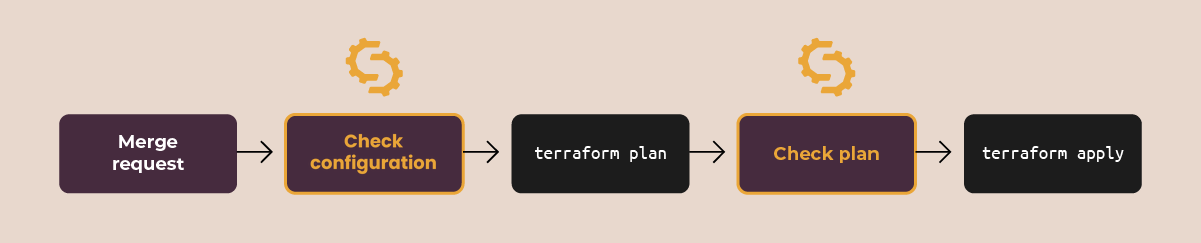
Checkpoint 1, at merge request: Spotter validates the code against official provider definitions. If a check fails, the merge request fails.
Checkpoint 2, before apply: Spotter checks the resolved plan with built-in checks and your custom policies. If a check fails, the apply is blocked.
Both run inside your existing CI/CD tool, whether that’s GitLab CI, GitHub Actions, Jenkins or Azure DevOps. Spotter decides whether a change is allowed through, and your pipeline still runs terraform apply.
One set of rules and one audit trail for Ansible and Terraform
Rules like “no admin ports open to 0.0.0.0/0” or “every resource needs an owner tag” only protect production if every pipeline enforces them. Policy-as-code turns each rule into a check you write once and run in every pipeline, for every team and every author, including AI. Because the policy also runs on the plan, it catches violations hidden behind variables, like the security group rule above.
Every check then sends its result to one place. Platform leads see which policies pass or fail across repositories, and security teams get a record of what was checked, when and with what result, without chasing each team before an audit.
That record is even more useful when it covers all of your automation. Most organizations run Terraform next to Ansible, and governing them with separate tools means separate rules, separate reports and separate gaps. Spotter is the shift-left governance layer for both, so security gets one view of everything that reaches production. Together, these cover all four parts of a governance layer: policy, coverage, enforcement and evidence.
See the full policy gate live
Shift-left security for Terraform comes down to two checkpoints and one set of rules: check the code at merge request, check the plan before apply, and send every result to one place your security team can audit.
On Thursday, November 12 at 3 PM CET, we’ll build this policy gate live in a CI/CD pipeline in 45 minutes. Everyone who joins live can book a free Terraform script assessment.
Frequently Asked Questions
Does Steampunk Spotter scan Terraform plans?
Yes. Since the latest release, Spotter scans the plan file produced by terraform plan -out. It runs built-in checks and your custom policies on the resolved values, flags secrets in cleartext, and blocks changes that break a policy before terraform apply.
What is shift-left security for Terraform?
Shift-left security for Terraform means moving security and policy checks earlier, before changes are applied to infrastructure. In practice, that means checking Terraform code at merge request and the resolved plan before apply, inside the CI/CD pipeline. Problems are caught while they’re still cheap to fix, instead of after the apply or during an audit.
Does sensitive = true protect secrets in Terraform plan files?
No. The sensitive flag hides values in the CLI output, but the saved plan file still contains them. If plan files are stored as CI artifacts, anyone with artifact access can read those values. Scanning the plan before apply and restricting artifact access both reduce the risk.
How do I add policy-as-code to a Terraform CI/CD pipeline?
Add a policy check as a pipeline step at two points: when a merge request opens, on the Terraform code, and after terraform plan -out, on the plan file. Configure each step to fail the pipeline when a policy is violated. Store policies centrally so every team’s pipeline uses the same set.
Can I use one tool to govern both Ansible and Terraform?
Yes. A governance layer that supports both stacks lets you apply one policy approach and keep one audit trail for all of your Infrastructure as Code. Steampunk Spotter checks Ansible Playbooks and Terraform code and plans, and sends every result to the same place.