Steampunk Spotter
Steampunk Spotter: Bringing governance into your CI/CD pipeline
August 20, 2026 - Words by Lucija Korbar - 7 min read
Your infrastructure code already has a pipeline. Probably two — one that ships Ansible Playbooks, one that runs terraform apply — and somewhere in each, someone is supposed to be checking whether the change is safe. Usually that someone is a senior engineer with too many tabs open.
That’s the governance gap. Not a missing tool, but a missing decision point. Standards exist — in a wiki page, a Confluence doc, or the head of whoever wrote the first playbook. Review happens, but it depends on who’s on shift and how big the diff is. Nothing in the pipeline actually stops content from reaching production because it broke a rule.
With two stacks, the usual fix can make things worse. Each stack gets its own tooling, and each tool arrives with its own policy language, its own report format, and its own dashboard. Now you have two sets of rules, two places to define them, and no simple answer to “is our infrastructure code compliant?” that doesn’t start with “which half?”
The better approach is to put governance into the pipeline you already have.
A scanner tells you what’s wrong. A governance layer decides what’s allowed to run
A scanner produces findings. Someone reads them, forms an opinion, and decides what to do — which means the standard is whatever that person concluded on that day. A governance layer holds the policy itself and applies it identically every time, at every point where code moves forward, no matter who’s looking at it. Instead of leaving decisions to individual interpretation, it makes the expected standard explicit and repeatable.
And with AI generating and modifying code, this becomes even more important. AI can produce different outputs for the same request, and it’s not always obvious what changed or why. A consistent set of rules gives you something to check those changes against before the code moves on.
That’s what Steampunk Spotter is – a governance layer for Ansible Playbooks and Terraform configurations, running where your teams already work: the CLI, a VS Code extension, a GitHub Action, a GitLab CI job, a Jenkins stage, and a pre-execution check inside Red Hat Ansible Automation Platform (AAP).
One layer, two automation stacks, and the same governance approach wherever the code is evaluated.
Where Steampunk Spotter fits into your CI/CD pipeline
Governance doesn’t have to mean adding another workflow for developers to learn. The point is to add checks to the workflow you already have.
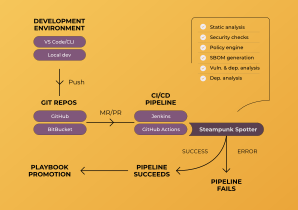
A typical setup looks like this:
Write → Review → Deploy → Run
The same Spotter engine and your defined policies can be used at different points, with each stage serving a different purpose.
1. Locally – catch issues before the code is anyone else’s problem
The earliest opportunity to fix an issue is while the code is still being written.
A developer can run spotter scan --rewrite to scan the working directory and automatically apply the fixes Spotter can handle. For Ansible engineers, the VS Code extension brings checks directly into the editor, flagging issues while the Playbook is being written.
Either way, this is the only stage where a violation costs nothing to correct — the code hasn’t been reviewed, merged, or explained to anyone yet.
But local checks are not enough. Developers can forget to run them, configuration can change, or content can enter the repository through another path.
That’s why the next step belongs to CI/CD.
2. On the pull request - make governance a required check
This is where automated governance becomes a real gate. Instead of relying on every developer to remember to run a scan, Spotter can run automatically as part of the CI pipeline. A failed check can prevent the change from being merged. What the gate looks for: hardcoded credentials, deprecated or removed modules, unqualified module names, risky parameter values, unpinned dependencies, and anything that breaks a policy you’ve written. Ansible Playbook security stops depending on whether a reviewer knew to look.
Setting it up takes a few lines in your pipeline config — a ready-made action for GitHub Actions , the CLI for GitLab CI , Jenkins , or Azure DevOps . And we’ve covered GitLab and Jenkins in more detail in previous blog posts.
Findings land in GitHub’s Security tab, GitLab’s pipeline report, AzureDevOps’s pipeline result, or your SonarQube dashboard – wherever your security team is already looking. You decide what’s strict: block the merge on secrets and critical security findings, report everything else. Gates that fail builds over style get switched off within a month — developers route around noise, and once a gate gets disabled once, nobody turns it back on. Save the hard blocks for what actually matters: secrets and critical findings.
3. Before deployment – check the full picture
A pull request only shows you the diff; this stage looks at everything you’re about to ship. It’s where broader policies and checks come into play. Your own policies — written as REGO, evaluated by OPA — run against the whole codebase: one rule set applied to your infrastructure code whichever stack it targets. Alongside them, Spotter provides more than 200 built-in checks covering validation, best practice, security, and upgrade readiness.
Spotter also provides supply chain visibility through SBOM and CVE reporting on the dependencies your automation pulls in, as well as compliance validation against benchmarks like CIS, with prebuilt policies for RHEL, Azure, AWS, Windows, and Cisco.
This is the last point where content can be rejected while a rollback is still just a failed job.
4. On a schedule - governance doesn’t end when the pipeline succeeds
Nothing in the repo changed, but the risk did. A CVE gets disclosed in a collection you’ve been shipping for a year; a policy gets tightened after an audit finding.
That’s why the same Spotter checks can also run on a schedule against your main branch. A nightly or weekly scan gives you a current view of your automation estate against today’s rules and advisories, rather than the ones that happened to apply on merge day.
And what happens when code bypasses the pipeline?
CI/CD governance works well when automation follows the expected path. Inherited content, a third-party collection, a playbook someone imported last year, an operator launching a job template straight from the UI — none of it passes through the checks you just set up.
That’s why governance shouldn’t stop at the pipeline. Inside Red Hat Ansible Automation Platform , Spotter inspects the job before it runs and checks parameter values during it, stopping a run that violates policy instead of reporting it afterwards.
This gives you a final enforcement point for automation that didn’t necessarily pass through your normal development workflow. The principle stays the same: check early, enforce throughout, and have a final control before execution.
One governance model across your automation pipeline
This is policy as code: you define the rule once, in a file you version alongside everything else, and it applies the same way throughout your automation process. Write it as REGO — or describe it in plain language and let the AI Policy Generator write it for you — and the same rule applies throughout your automation process.
That gives you the four things governance actually requires.
- Policy - standards you can define, read, and version.
- Coverage – checks across both stacks and the dependencies underneath them.
- Enforcement - points where a violation stops rather than gets logged.
- Evidence — dashboards, trends, and an audit trail showing what was checked, when, and what happened next.
When an auditor asks how you know your infrastructure code is compliant, you have something they can check without taking your word for it. The policy file says what the rule was, the pipeline log says when it ran and what it found, and neither depends on anyone’s recollection.
Where the value shows up
Putting Spotter into the CI/CD pipeline isn’t about adding another step for the sake of adding one. It’s about removing manual work and catching problems before they become production problems.
Fewer failures
Customers report 82% fewer automation errors. This means fewer failed executions, fewer incidents to investigate, and fewer rollbacks for your team to deal with.
Less manual review
Automated checks take care of issues that don’t need senior-engineer judgement, so experts can focus on the changes that actually require a human decision.
Teams have seen up to 70% productivity boost, with 413% ROI reported across accounts we’ve measured.
Reduced risk
In an eight-week pilot across 380 Playbooks, 15 execution environments, and 25,000 AAP nodes, CVEs went from 39 to 7, hardcoded secrets from 26 to 0, and high-risk findings from 23 to 0 — while automation coverage increased by 22% as the team could confidently expand its use of Ansible Collections, with SBOMs providing the dependency visibility and security checks they previously lacked.
The important part isn’t simply the numbers. It’s that security and compliance controls were built into the automation workflow instead of relying on separate, manual reviews.
When the checks run automatically as part of the pipeline, improvements become repeatable, measurable, and easier to prove.
Your pipeline already exists. Put governance in it.
You’re not choosing between governance and developer velocity, and you’re not buying a platform per stack. With Spotter, you’re adding a decision point to the pipelines you already run — one that applies the same rule to every Ansible Playbook and every Terraform configuration, no matter who, or what, wrote it.
If you’d like to see where Spotter would fit into your existing pipeline — GitHub, GitLab, Jenkins, AAP, or a combination of them — book a live demo and we’ll walk through it with your setup.